Overview
I designed and built an AI-powered travel planning app that generates optimized multi-stop itineraries, helping users reduce planning friction and decision fatigue when organizing complex trips.
- Built using Figma Make + OpenAI API + Google Maps APIs + Supabase
- Reduced trip planning time from ~30 min → <5 min (prototype testing)
- Write 100% code by myself using AI-assisted development: Figma Make, Cursor and Claude Code
- Owned end-to-end development from product strategy → UX → implementation → iteration
Problem
During my family trip to Florida, where we visited a different city each day, I realized that planning trips across multiple destinations is fragmented and repetitive. For each day, I needed to discover a list of places to visit, figure out the most efficient route so I wouldn’t go back and forth, and have a way to save and clearly visualize my plan, and share it out when needed.
During this process, I identified the following pain points:
Discovering where to go is tedious and scattered
I often had to switch between Google, map apps, ChatGPT, and other sources to decide on destinations.
Existing tools optimize for search, not planning workflows
They help find places, but don’t support organizing them into a structured daily plan.
No easy way to visualize and save plans on a map
There isn’t a simple way to see all selected places together and revisit the plan later.
No simple way to optimize routes across multiple stops
Planning efficient routes requires manual effort and constant adjustment.
Target Users
This is a consumer-facing tool designed for travelers planning multi-stop daily itineraries, particularly those who value efficiency and need a seamless way to organize, optimize, and visualize their plans.
Solution
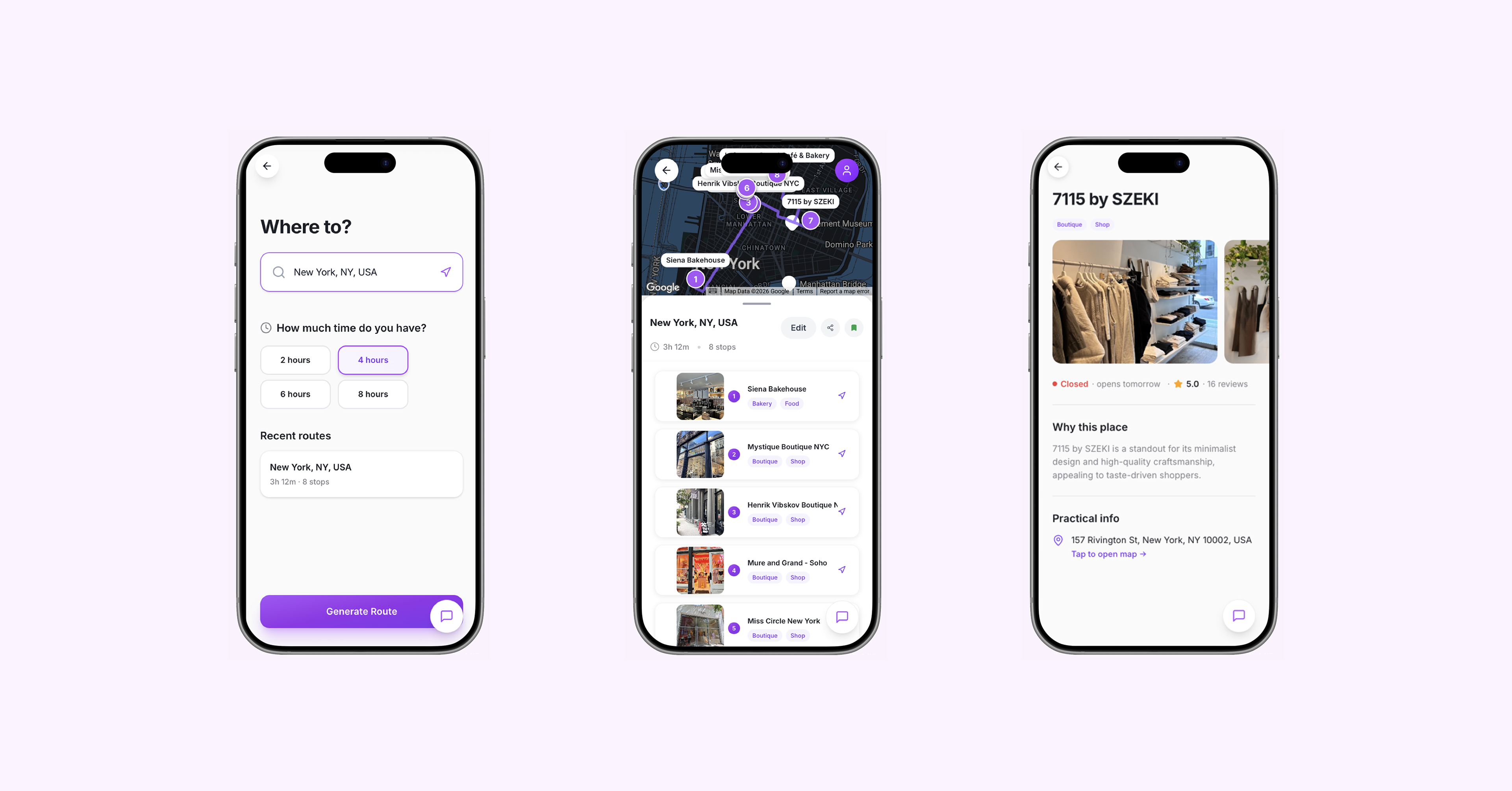
A map-based travel planner that helps users discover destinations and turn them into optimized, flexible multi-stop itineraries—balancing AI-powered recommendation with user control.
Key Feature
🗺️ Place discovery based on city input
Generate relevant destination recommendations to kickstart planning
🔄 Multi-stop route optimization with manual control
Automatically optimize travel sequence as places added with the ability to reorder and re-optimize
📍 Place details page
View ratings, hours, and key information to support decision-making
💾 Trip saving and retrieval
Save past itineraries for easy access, reuse, and edit
Takeaways
1. AI-assisted “vibe coding” significantly accelerates the path from concept to working product
Building functional prototypes (not just mockups) enables more realistic user testing and higher-quality feedback. However, establishing a clear codebase structure upfront—such as organized folders and modular components—is critical. Tools like Cursor and Claude can support this, but thoughtful scaffolding remains a foundational step.
2. The optimal interaction model combines AI output with human flexibility
Starting with AI-generated suggestions (e.g., route optimization) and allowing users to manually adjust preserves both efficiency and control. This balance improves usability by enabling fast exploration without sacrificing real-world flexibility.